Hailuo 2.3 Review: AI Video with Real Emotions and Expressions
Hailuo 2.3 by MiniMax is noticeably better at facial expressions and emotions of people on screen. We cover its modes, clip lengths, pricing and prompts for expressive scenes.

Hailuo 2.3 is a video generation model by MiniMax that focuses on the people in the frame: facial expressions, gaze and emotion. It creates clips from a text prompt or animates an uploaded photo, with a length of 6 or 10 seconds. In this Hailuo 2.3 review we cover what the model does, Hailuo 2.3 pricing, how to use Hailuo 2.3 online in WebTerra AI and how to write prompts that make characters feel alive.
MiniMax is known for the Hailuo family of video models, as well as models for music and voice. In the WebTerra AI catalog, version 2.3 is described as noticeably better than its predecessor at facial expressions and character emotions. That is why it is recommended for videos with people: close-ups, reactions, conversational moments and emotional beats in ads.
Who needs it? Social media managers looking for lifelike “human” shots for Reels, advertisers testing creatives before a shoot, makers of short stories and music videos, and anyone who wants to bring a portrait or a family photo to life.
What Hailuo 2.3 can do
The model has two modes:
- Text to video. Describe a scene and the model generates a clip from scratch.
- Image to video. Upload an image and the model animates it according to your prompt: the person starts to smile, turns their head, laughs.
Key features:
- Expressions and emotions. The main upgrade in 2.3 — more convincing facial expressions, smiles, laughter and shifts in mood.
- 6 or 10 seconds. Six seconds is the default; ten is for scenes that need room to develop.
- Prompts up to 2,000 characters. Plenty of space to describe the character, the action, the light and the camera.
- A wide preset library: cinematic shot, product video, nature and time-lapse, animate a photo, emotional close-up, first-person vlog, food close-up, fantasy scene, sports slow motion and interior walkthrough.
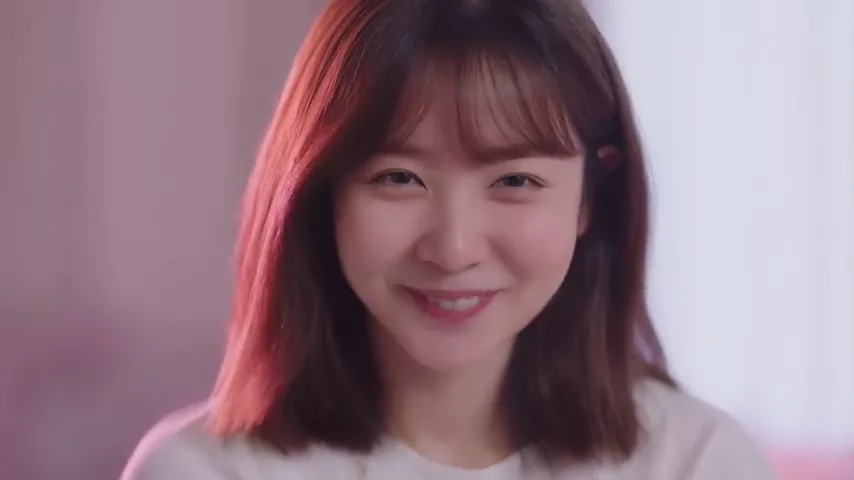
The model’s demo clip is a close-up of a young woman laughing genuinely, then looking into the camera with a warm smile. It captures the Hailuo 2.3 profile well: a subtle transition between emotions within a single short shot.
Hailuo 2.3 specs
| Parameter | Value |
|---|---|
| Developer | MiniMax |
| Type | Video generation |
| Input modes | Text; image → video |
| Duration | 6 or 10 seconds (6 by default) |
| Prompt limit | 2,000 characters |
| Profile | Characters, expressions, emotions |
| Price per generation | 40–45 credits for 6 seconds (about $0.46–0.58) |
How to use Hailuo 2.3 in WebTerra AI
- Sign up — new accounts get 60 free credits, enough for one 6-second clip.
- Open the video generator in your dashboard and select Hailuo 2.3.
- Choose a mode: text description or photo upload.
- Write a prompt (up to 2,000 characters) or start from a preset such as Emotional close-up.
- Pick the duration — 6 or 10 seconds.
- Start the generation and wait for the result. Video takes longer than images, so you can prepare your next prompt meanwhile.
- Review and download the clip. If the emotion is off, refine the description and try again.
All video models in the service, with prices and strengths, are on the AI video generation page.
Hailuo 2.3 pricing
Price of a 6-second clip on each plan:
| Plan | Credits for 6 s | Price in USD |
|---|---|---|
| Starter | 45 | about $0.58 |
| Pro | 43 | about $0.52 |
| Ultra | 40 | about $0.46 |
The 60 free credits cover one 6-second clip on any plan — a good chance to see how the model handles emotion in your own scenario. A 10-second clip costs more; the dashboard shows the exact amount before you start. Credit packs are on the pricing page.
Tip: iterate on your prompt with 6-second clips, and switch to 10 seconds only once the scene is dialed in and genuinely needs more time.
Hailuo 2.3 prompt examples
The first prompt is the one used for the model’s own demo clip.
Emotional close-up
Close-up of a young woman laughing genuinely, then looking at the camera with a warm smile, soft pink rim light, natural expression, no text, no captions, no watermark
The demo prompt: a transition from laughter to a smile with soft rim light. “No text, no captions, no watermark” keeps stray lettering out of the frame.
Reaction to news
Medium close-up of a man in his thirties reading a message on his phone, his expression changing from confusion to surprise to joy, cozy living room, evening lamp light, handheld camera
A sequence of changing emotions — exactly where Hailuo 2.3 shines.
Animate a portrait (from a photo)
The person in the photo slowly turns toward the camera, blinks and gives a gentle, slightly shy smile, subtle head movement, natural lighting
For image-to-video: short, natural movements without abrupt changes.
Product video with a person
A young woman takes a sip of iced coffee in a sunny café, closes her eyes and smiles with pleasure, shallow depth of field, warm summer tones, advertising style
The pleasure of using a product — a classic ad shot.
First-person vlog
First-person vlog shot, a cheerful woman holds the phone at arm's length and talks excitedly while walking through a busy street market, natural daylight, slight camera shake
A “filmed on a phone” look for Reels and Stories.
Cinematic drama
Cinematic close-up of an elderly man looking out of a rainy window, a single tear rolling down his cheek, soft cold light, slow push-in, melancholic mood
Restrained emotion and a slow camera move for an atmospheric piece.
Tips for writing Hailuo 2.3 prompts
Describe emotion as it changes
Instead of “happy woman”, describe how the expression evolves: “laughs, then looks at the camera with a warm smile”. The model performs best on transitions between states.
Choose the right shot size
Expressions read best in close-ups and medium close-ups. If the character is far away in the frame, subtle emotions get lost — for people-focused clips, go with close-up or medium close-up.
Light sets the mood
“Soft pink rim light”, “evening lamp light”, “cold window light” — describing light makes emotion more expressive and sets the atmosphere of the whole shot.
One action per 6 seconds
In six seconds a character can laugh and look into the camera, but not cross a room, sit down, open a laptop and write an email. For more complex scenes use 10 seconds or split the story into several clips.
Use the character limit wisely
2,000 characters is a lot, but longer is not always better. Start with one or two sentences about the character and action, then add light, camera and style. Remove contradictory details.
Keep text out of the frame
End your prompt with “no text, no captions, no watermark” to avoid random letters and logos.
For photos, describe only the motion
In image-to-video mode there is no need to describe the person’s appearance again — the model sees it in the photo. Focus on what should happen: a head turn, a smile, a blink.
Building a longer video from Hailuo 2.3 shots
A 6–10 second shot is a building block. A full ad or story usually consists of several of them. Here is a proven approach:
- Write a storyboard. Three to five shots, each with one action and one emotion: the character sees the product, tries it, smiles, looks into the camera.
- Lock the character with a photo. To keep the person consistent across shots, generate or choose one portrait and use image-to-video for every scene. Face, hair and clothes stay stable.
- Keep a single style. Repeat the same lighting and palette descriptions in every prompt, e.g. “warm summer tones, soft daylight”.
- Generate with a buffer. Make two takes of key shots and keep the best emotion.
- Edit and add sound. Assemble the shots in an editor, then add sound with a separate model, plus music and titles.
This gets you a 20–30 second video with a recognizable character and lifelike emotion, all from one dashboard.
Who Hailuo 2.3 is for
- Social media and creators. Lifelike human shots for Reels, Shorts and Stories.
- Advertising. Emotional product scenes: delight, surprise, joy.
- Marketplaces. Short clips of a person using the product.
- Music video and story makers. Emotional close-ups for clips and short films.
- Family projects. Animating portraits and photos for greetings.
- Storyboarding and pre-production. Testing a scene idea before a real shoot.
Hailuo 2.3 vs other video models
| Model | Profile | When to choose it |
|---|---|---|
| Hailuo 2.3 | Emotions and expressions, 6 or 10 s | Videos with people, close-ups, reactions |
| Hailuo 02 | Fast photo-to-video | You need to animate an image quickly |
| Kling 3.0 | Top motion quality | Complex dynamics and movement |
| Veo 3.1 | 4K, with sound | High resolution and sound in one go |
| Seedance 2.0 | Audio + multi-scene | Several scenes and sound in one clip |
Choose Hailuo 2.3 when a person and their emotions are at the center of the shot. For a quick photo-to-video result, read our Hailuo 02 review — the predecessor of 2.3. For complex motion and dynamics, Kling 3.0 is a stronger candidate. When you need sound generated together with the video and resolution matters, compare with Veo 3.1, and for multi-scene clips with audio, with Seedance 2.0. For budget work there are also Wan 2.7 and Veo 3.1 Lite.
Hailuo 2.3 limitations
- Only two durations: 6 or 10 seconds. Longer stories have to be assembled from several clips.
- Prompt limit of 2,000 characters. Longer descriptions are not accepted.
- Sound is not listed on the model card. To add sound, use a separate video-to-audio model such as Cassette Video SFX, or pick a model with built-in audio.
- Complex choreography. The model may simplify many actions packed into one short shot — plan one key action.
- Ethics. Only animate photos of people who have agreed to it, and never create misleading videos on behalf of real people.
FAQ
How much does a Hailuo 2.3 video cost?
A 6-second clip is 45 credits on Starter (about $0.58), 43 on Pro (about $0.52) and 40 on Ultra (about $0.46).
How long are the clips?
6 or 10 seconds, with 6 as the default.
Can I animate my own photo?
Yes, in image-to-video mode: upload a photo and describe the movement or emotion to add.
Are the free credits enough?
60 credits cover one 6-second clip on any plan.
How is Hailuo 2.3 better than Hailuo 02?
According to the catalog, 2.3 is noticeably better at facial expressions and character emotions, while Hailuo 02 is positioned as fast photo-to-video.
Does Hailuo 2.3 generate sound?
Sound is not listed among its features. Add audio afterwards with a video-to-audio model, or choose a video model with built-in sound.
Hailuo 2.3 is a strong pick whenever a clip needs real human emotion: a smile, laughter, a reaction, a glance into the camera. Claim your 60 free credits and create your first clip in WebTerra AI.
Try AI models yourself
Models for video, images and audio in one place — 60 credits free when you sign up
Start for free