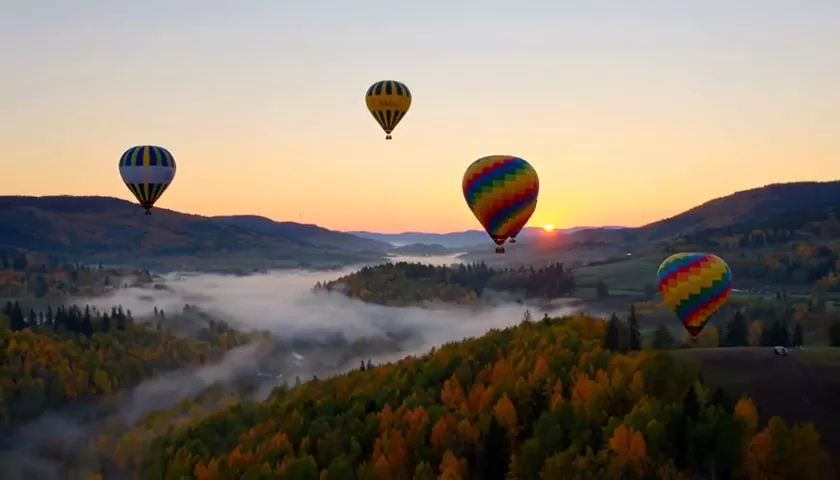
Hailuo 02 Review: Fast, Affordable Video from Text and Photos
Hailuo 02 by MiniMax is a budget-friendly video model for text-to-video and photo-to-video with good value for money. 6 or 10 second clips, first and last frame.

Hailuo 02 is a video generation model from MiniMax that creates clips from a text description or from a photo. Its main selling points are speed and an affordable price with good value for money. If you need to produce short clips for social media regularly, animate product photos or test ad ideas without paying premium-model prices for every attempt, Hailuo 02 deserves a place near the top of your list. In this Hailuo 02 review we cover modes, durations, pricing, prompt examples and tips.
MiniMax develops generative models for text, speech, music and video. Hailuo is its video line, and version 02 sits in the WebTerra AI catalog as the fast, budget option: “fast photo-to-video”.
The model suits social media managers, online store owners, creators and marketers — anyone who makes lots of short clips and values a predictable budget. In WebTerra AI, Hailuo 02 runs online in the browser, with nothing to install and no separate subscription.
What Hailuo 02 can do
- Text-to-video. Describe a scene and the model creates a clip.
- Image-to-video. Upload an image and the model brings it to life with camera movement, character motion and atmosphere.
- First and last frame. Set the frame the clip starts with and the frame it ends on, and the model builds the transition between them. Great for transformations, before-and-after shots and smooth scene changes.
- Two durations. 6 or 10 seconds, with 6 as the default.
- Long prompts. Up to 2,000 characters — plenty for a detailed description of the scene, camera movement and mood.
The dashboard has presets for common jobs: cinematic shot, product video, nature and time-lapse, animate a photo, vertical social video, first-person vlog, food close-up, fantasy scene, sports slow motion and interior walkthrough.
Hailuo 02 specs
| Parameter | Value |
|---|---|
| Developer | MiniMax |
| Type | Video generation |
| Input modes | Text, photo (image-to-video) |
| First and last frame | Yes |
| Duration | 6 or 10 seconds |
| Prompt limit | 2,000 characters |
| Price for a 6 s clip | 39–43 credits (about $0.45–0.55) |
How to use Hailuo 02 in WebTerra AI
- Sign up for WebTerra AI — you get 60 free credits.
- Open the video generator in the dashboard and select Hailuo 02.
- Choose a mode: text or photo. For photo mode, upload an image; optionally set a first and last frame.
- Write a prompt or start from a preset and add your own details.
- Pick a duration — 6 or 10 seconds.
- Run the generation, watch the clip and download it.
Tip: run your first tests at 6 seconds. It is cheaper, and that is long enough to see whether the model understood the motion and the mood. Once you have a prompt that works, move up to 10 seconds.
Hailuo 02 pricing
Cost of one 6-second clip (default settings):
| Plan | Credits | Price |
|---|---|---|
| Starter | 43 | about $0.55 |
| Pro | 41 | about $0.49 |
| Ultra | 39 | about $0.45 |
A 10-second clip costs more; the dashboard shows the exact amount before you start. The 60 free credits from sign-up cover one 6-second Hailuo 02 clip — enough to judge the quality on your own idea. For regular use, compare packs on the pricing page: credits get cheaper on higher plans.
Hailuo 02 prompt examples
The first prompt is the one used for the model’s demo clip.
A golden retriever puppy running towards the camera across a sunlit meadow in slow motion, ears flapping, warm backlight, shallow depth of field, no text, no captions, no watermark
A puppy runs toward the camera across a sunny meadow in slow motion. Note the “no text, no captions, no watermark” ending — it helps keep stray lettering out of the frame.
Slow cinematic dolly-in on a glass bottle of cold brew coffee on a wet stone surface, condensation droplets, soft studio light, dark background
A product video for an ad or a marketplace listing.
Time-lapse of clouds rolling over a mountain lake at sunset, reflections on the water, golden to purple sky
Nature and time-lapse for a background, an intro or a calming video.
First-person POV walking through a cozy morning market, handheld camera feel, people buying fresh bread, natural light
A first-person vlog shot that looks filmed on a phone.
Close-up of hot pancakes being drizzled with honey, steam rising, slow motion, warm kitchen light
A food close-up for a menu, a delivery app or Reels.
Smooth camera glide through a bright Scandinavian apartment, living room to kitchen, morning sunlight, real estate video
An interior walkthrough for a property listing or a designer’s portfolio.

Tips for writing Hailuo 02 prompts
Describe motion, not just the picture
Video is change over time. Besides what is in the frame, say what moves and how: “running towards the camera”, “steam rising”, “leaves swaying”. Without motion cues the model may produce an almost static shot.
Direct the camera
Terms like “dolly-in”, “slow pan left”, “tracking shot”, “aerial view” and “handheld” help you get the dynamics you want. For short clips, one clear camera move beats several.
Use the 2,000 characters wisely
The limit lets you go into detail, but put the essentials first: subject, action, place. Then light, mood and style. A long list of minor details can blur the focus.
Photo mode: do not contradict the image
When animating a photo, the prompt should build on what is already there, not change the scene. Describe motion and atmosphere, not new objects that are not in the photo.
First and last frame for transitions
Provide two images — an empty room and a furnished one, a sketch and the finished product, day and night — and the model builds a smooth transition. It works best when both frames share a similar angle.
Add “no text, no captions, no watermark”
That tail from the demo prompt is an easy way to reduce the chance of random lettering in the frame.
A prompt template for Hailuo 02
To avoid starting from a blank page every time, use a simple five-part structure that adapts to any idea:
- Subject: who or what is in the frame — “a ceramic mug of cocoa”, “a young woman in a yellow raincoat”.
- Action: what happens — “steam rising”, “walking along a rainy street”.
- Place and time: where and when — “on a wooden windowsill, snowy evening outside”.
- Camera: how it is shot — “slow dolly-in”, “static close-up”, “tracking shot from the side”.
- Light and style: the mood — “warm cozy light, cinematic, shallow depth of field”, plus “no text, no captions, no watermark”.
A prompt like that fits in two or three lines yet covers everything the model needs. If the result is off, change one part at a time so you can see what actually made the difference.
Building a longer story from short clips
One clip maxes out at 10 seconds, but several generations can be edited into a 30-second or one-minute piece. A few techniques that keep it tidy:
- Keep one style. Repeat the same light, color and style descriptions in every prompt so the cuts do not jar.
- Use photo mode. If a character or product must look the same in every scene, generate the clips from the same image.
- Continue scenes through frames. Save the final frame of one clip and use it as the first frame of the next for continuous motion.
- Plan the rhythm. Short 6-second pieces with changing angles suit Reels; longer 10-second shots suit atmospheric videos.
Once the clips are cut together, add music, a voiceover or sound effects and you have a finished piece for social media or an ad. Because each generation is relatively cheap, it is worth producing one or two spare takes of the key scenes — having options in the edit is often what separates a clip that feels stitched together from one that flows.
Who Hailuo 02 is for
- Social media and Reels. Short atmospheric clips for regular posting on a tight budget.
- Marketplaces and online stores. Animated product photos for listings and ads.
- Advertising. Fast testing of ideas and creatives before producing in a pricier model.
- Restaurants and delivery. Mouth-watering food clips.
- Real estate and interior design. Walkthroughs and before-and-after transitions.
- Creators. Intros, cutaways and POV shots.
More video models are on the video generation page.
Hailuo 02 compared with other video models
| Model | Highlight | Choose it when |
|---|---|---|
| Hailuo 02 | Fast and affordable, text and photo, first/last frame | Lots of short clips, idea tests, photo animation |
| Kling 2.5 Turbo Pro | Up to 10 s, realistic | You need realistic motion |
| Veo 3.1 | 4K, with sound | Premium quality with sound out of the box |
| Veo 3.1 Lite | Budget Veo, 1080p | You want the Veo family for less |
| Seedance 2.0 | Audio + multi-scene | A multi-scene clip with sound |
| Wan 2.7 | Open source, affordable | Another budget alternative |
Hailuo 02 is the rational choice when volume and budget matter. For the most realistic motion, see our Kling 2.5 Turbo Pro review. For premium quality with sound, read about Veo 3.1, and for complex multi-scene clips, Seedance 2.0. Another affordable alternative is Wan 2.7. If you already have a soundtrack, put it on your clip with Audio Merge.

Hailuo 02 limitations
- Only two durations. 6 or 10 seconds; longer stories have to be assembled from several clips.
- Budget class. The model offers good value for money, but premium ads or cinematic scenes may call for higher-end models.
- Welcome credits cover one clip. A series of tests will need a credit pack.
- Prompt-dependent results. A vague description of motion gives flatter dynamics.
FAQ
How much does a Hailuo 02 clip cost?
A 6-second clip costs 39–43 credits depending on the plan — roughly $0.45–0.55. A 10-second clip costs more.
What durations are available?
6 or 10 seconds.
Can I make a video from a photo?
Yes, image-to-video mode animates an uploaded image. You can also set a first and last frame.
How long can the prompt be?
Up to 2,000 characters.
Is it good for Reels and Stories?
Yes — the dashboard has a dedicated “Vertical social video” preset for short, punchy Reels content. Use it as a base and add your own story.
How do I add music or a voice?
Generate audio with the WebTerra AI audio models and put it on the video with Audio Merge.
Try Hailuo 02 online
Hailuo 02 is a practical tool for anyone who needs many short clips without a big budget. Claim your 60 free credits, generate your first 6-second clip and judge the result in the WebTerra AI dashboard.
Try AI models yourself
Models for video, images and audio in one place — 60 credits free when you sign up
Start for free