Ideogram Character Review: One Character, Any Scene
Ideogram Character takes a single photo and puts the same person into any scene, outfit or art style. Here is what it does, what it costs and how to prompt it well.
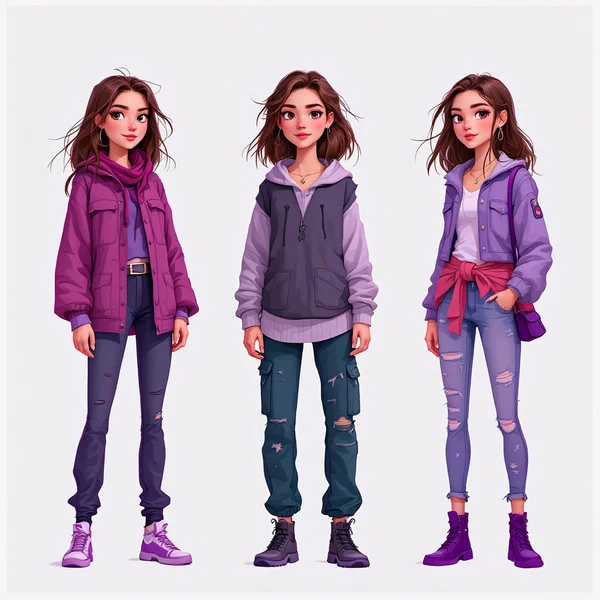
Ideogram Character is a model from Ideogram built around a problem that generative images have always struggled with: keeping a specific person recognizable while changing everything around them. You upload one photo, describe the scene, the outfit or the art style, and get a brand-new image with the same person in it. In this Ideogram Character review we cover what the model can do, how much a generation costs in WebTerra AI, and how to write prompts that give predictable results.
The model is useful for anyone who needs lots of different shots of one person without organizing a photo shoot: consultants and freelancers building a portfolio, social media managers producing a consistent content series, course creators, bloggers, and people who simply want a fresh profile picture or a version of themselves as a comic book hero. Ideogram Character runs online in your browser — there is nothing to install.
Ideogram as a company is best known for strong typography and text rendering inside images. Character is a separate direction within its lineup, focused entirely on character consistency: one person, many scenes.
What Ideogram Character can do
The model card sums it up in one line: it keeps the look of the person in your photo and places them in any scene, style and outfit you describe. In other words, the input photo is not a canvas for pixel editing — it is a reference for the face and overall look, from which the model builds an entirely new frame.
- Image-to-image mode. The input is one photo of a person plus a text description of what you want.
- A single reference. The model accepts one reference image, so the quality of that photo directly affects the likeness.
- New scenes. An office, a coffee shop, mountains, a conference stage, a neon-lit city — the setting is defined by text.
- New outfits and eras. A business suit, a vintage dress, a spacesuit, a look from the 1920s.
- Art styles. Photorealism, comics, graphic novels, video game promo art, magazine covers.
- Balanced rendering by default. In WebTerra AI the model runs with the BALANCED rendering speed setting — a compromise between generation time and quality.
The dashboard includes ready-made presets that show typical use cases: “Business headshot” for your CV and LinkedIn, “Social media avatar”, “Same character, new scene”, “New look and style”, “Expert portrait” for a website, course or business card, “Magazine-style portrait”, “Seasonal photo shoot” with New Year, autumn or summer vibes, “Comic book hero”, and the trending “GTA VI poster hero”. A preset fills in a proven prompt template that you can keep as is or extend with your own details.
Ideogram Character specs
| Parameter | Value |
|---|---|
| Developer | Ideogram |
| Type | Image generation, characters and avatars |
| Input mode | Image-to-image: photo + text prompt |
| Reference images | 1 |
| Default setting | BALANCED rendering speed |
| Size used for pricing | 1024 × 1024 |
| Price per generation | 22–24 credits (about $0.25–0.31 depending on plan) |
How to use Ideogram Character in WebTerra AI
- Sign up or log in and open the image generation dashboard. New users get 60 free credits.
- Pick Ideogram Character from the model list — you will also find it in the AI avatars section.
- Upload one photo of the person. A sharp portrait, facing the camera or slightly turned, with even lighting and no sunglasses works best.
- Choose a preset or write your own prompt: where the person is, what they are wearing, what the light and style should be.
- Click “Generate”. Credits are only charged when you start a generation, and the price is shown before you do.
- Review the result. If the likeness or the scene is off, change one detail in the prompt and run it again rather than rewriting everything.
- Download the image and use it on social media, your website or in a presentation.
Ideogram Character pricing
The cost of a generation depends on your plan: the higher the plan, the bigger the credit discount. Prices below are for a square 1024 × 1024 image with default settings.
| Plan | Credits per generation | Price in USD |
|---|---|---|
| Starter | 24 | about $0.31 |
| Pro | 23 | about $0.28 |
| Ultra | 22 | about $0.25 |
The 60 free credits you get on sign-up cover two Ideogram Character generations — enough to check how well the model holds on to your particular face and whether it suits your needs. For a full plan comparison, see the WebTerra AI pricing page.
Prompt examples
Write prompts in English and keep them focused on the scene rather than the face. Here are ready-to-use examples you can copy and adapt.
Business headshot
Professional business headshot of the same person, navy blazer, white shirt, soft studio lighting, neutral light grey background, confident friendly smile, shallow depth of field
A classic photo for a CV, LinkedIn or an “About us” page. A neutral backdrop and soft light give a clean result with no distractions.
Same character, new scene
The same person sitting at a wooden table in a cozy coffee shop, morning sunlight through the window, holding a cup of coffee, candid lifestyle photo, warm tones
A lifestyle shot for a blog or stories: the look stays the same, only the setting and mood change.
Expert portrait for a course
The same person standing on a conference stage, speaking into a headset microphone, large screen behind, dramatic stage lighting, professional event photography
Works for a course landing page, a webinar announcement or a speaker profile.
Seasonal photo shoot
The same person in a knitted sweater in an autumn park, golden leaves falling, warm backlight, soft bokeh, editorial photo
An autumn version; a New Year shot with string lights or a summer beach shot is just as easy.
Comic book hero
The same person as a graphic novel hero, bold ink outlines, halftone shading, dramatic city rooftop at night, dynamic pose, comic book cover style
A graphic novel treatment: the face should stay recognizable even in a drawn style.
Magazine cover
The same person in a fashion magazine cover shoot, elegant black outfit, high-contrast studio light, minimalist backdrop, glossy editorial look
A striking, cover-worthy shot for a profile picture or personal brand promo.
Tips for prompting Ideogram Character
Start with a good photo
Because the model works from a single reference, everything it knows about the face comes from that one image. Choose a shot where the face is well lit, not covered by hair, hands or glasses, and takes up a noticeable part of the frame. Group photos, heavy filters and blurry selfies lead to weaker likeness.
Say “the same person”
A phrase such as “the same person” or “the person from the reference” at the start of the prompt reminds the model that preserving the character is the main job. After that, describe the scene, outfit, pose and lighting — not the face, which is already in the photo.
Use a simple prompt structure
A handy order is: who (the same person) → what they are doing and how they pose → where they are → what they wear → lighting → style or type of shot. This keeps you from forgetting important details and makes targeted edits easy: change only the outfit line and you get a new version without surprises.
Don’t contradict the reference by accident
If your prompt describes a different eye color, hairstyle or age, the model will look for a compromise between the photo and the text, and the likeness may suffer. Change appearance deliberately and in small steps.
Give the style its own sentence
For stylized images, name the style clearly: “graphic novel”, “watercolor illustration”, “retro 1970s film photo”, “video game promo art”. The more specific the style, the more coherent the image looks.
Think in series, not single shots
The model’s strength is consistency. Keep the character and style description fixed and change only the scene — that way you get a series for a social media carousel or a set of website pages where the person looks the same throughout.
Use cases
- Consultants and freelancers — a business portrait and photos for a website, business card or marketplace profile without booking a photographer.
- Social media and bloggers — a series of images with one recurring character for posts, stories and video thumbnails.
- Course creators and online schools — speaker portraits for landing pages, announcements and certificates.
- Marketers — the same “face of the brand” across different ad scenes.
- Writers and creators — visualizing a story character across different episodes.
- Everyone else — a new avatar, a seasonal photo shoot or a trending game-poster look.
Comparison with other models
WebTerra AI has several tools that work with people in photos. They solve different tasks, so it helps to know when to pick each one.
| Model | What it does | When to choose it |
|---|---|---|
| Ideogram Character | Creates a new image with the same person | You need a new scene, outfit or style while keeping the look |
| Face Swap | Swaps a face on a photo | You already have the shot and just need a different face in it |
| Business Headshot | Photos for avatars and CVs | You need a straightforward business portrait, no creative experiments |
| Kling Avatar 2.0 | Talking avatar | You need a video where the person from the photo speaks |
| OmniHuman 1.5 | Gestures and expressions from audio | You want to animate a portrait to audio with expressive motion |
To be fair, Ideogram Character is not a replacement for video avatars — it only produces still images. But it pairs well with them: create a few portraits in the style you want first, then bring one of them to life in a video model. And if you already have a shot whose composition works, Face Swap is usually the simpler route.
Limitations
- One reference photo only. The model does not combine several shots of the same person, so a weak photo limits the result.
- Images only. The model does not create video or sound — use video models for that.
- Likeness is not guaranteed to be perfect. Tricky angles, heavy stylization or a contradictory prompt can alter facial features; sometimes it takes a few attempts.
- Use photos with permission. Generate images of yourself or of people who have agreed to it, and don’t create misleading content.
FAQ
How much does Ideogram Character cost?
One 1024 × 1024 generation costs 24 credits (about $0.31) on Starter, 23 credits (about $0.28) on Pro and 22 credits (about $0.25) on Ultra.
Can I try it for free?
Yes. After signing up for WebTerra AI you get 60 credits, which covers two Ideogram Character generations.
How many photos do I need to upload?
Just one. The model takes a single reference image, so pick your sharpest portrait.
Is it good for CV and LinkedIn photos?
Yes, there is a dedicated “Business headshot” preset. If all you need is a strict professional portrait, the separate Business Headshot model compared above is also worth a look.
Can I turn myself into a comic or game character?
Yes. The model has “Comic book hero” and “GTA VI poster hero” presets — upload a photo and pick the style.
What language should I write prompts in?
English works best — the model understands details more precisely. A short scene description that starts with “the same person” gives the most predictable results.
Ideogram Character is an easy way to get many different shots of one person without a photo shoot or retouching. Upload your photo in the WebTerra AI dashboard, use your free credits and see how the model places you in a new scene.
Try AI models yourself
Models for video, images and audio in one place — 60 credits free when you sign up
Start for free